configuration of .net core console application

In this blog post I will be discussing how to have a configurable .NET Core console application that reads values from a config file. First thing I did was create new vanilla .NET Core console application and at the time of writing v5.0 was available so I decided to use that as my target framework. I then had to install some Nuget packages to my solution which are needed to have this application configurable. The Nuget packages are the following;

  • Microsoft.Extensions.Configuration
  • Microsoft.Extensions.Configuration.Binder
  • Microsoft.Extensions.Configuration.EnvironmentVariables
  • Microsoft.Extensions.Configuration.Json

I then created a new appsettings.json file and just added some data which is what I’ll be retrieving. Here’s my sample that has some logging details and allowed CORS methods, which from my experience are common values you would find in a config file.

{
"Logging": {
"Url": "https://www.google.com",
"Username": "TestLoggingUsername"
},
"CorsAllowedMethods": "GET,POST,PUT,PATCH,DELETE,OPTIONS"
}

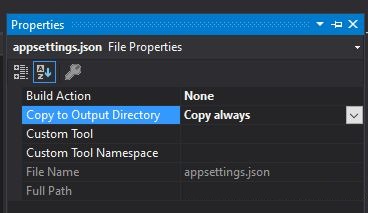
Once created we need to make sure that whenever the application builds a copy of the JSON file is created in the bin folder, the same directory where the application runs. To do that just right click on the file, click on properties and update as per the following screenshot.
Capture

I then created a couple models that reflect the structure of my appsettings.json file so that when I load my config values I parse them in my models and can be accessed easily.

public class AppConfig
{
public Logging Logging { get; set; }
public string CorsAllowedMethods { get; set; }
}
public class Logging
{
public string Url { get; set; }
public string Username { get; set; }
}

Lastly, I added a couple methods in my main Program class. The idea is to initialise the configuration, load the JSON file, build it (and this where the Nuget packages come into play) and map them to our models.

class Program
{
static void Main(string[] args)
{
var cfg = InitSettings<AppConfig>();
var loggingUrl = cfg.Logging.Url;
var loggingUsername = cfg.Logging.Username;
var corsAllowedMethods = cfg.CorsAllowedMethods;
Console.WriteLine($"{loggingUrl} {loggingUsername} {corsAllowedMethods}");
Console.ReadKey();
}
private static T InitSettings<T>() where T : new()
{
var config = InitConfig();
return config.Get<T>();
}
private static IConfigurationRoot InitConfig()
{
// load setup file name and path from appsettings.json
var builder = new ConfigurationBuilder()
.AddJsonFile($"appsettings.json", true, true)
.AddEnvironmentVariables();
return builder.Build();
}
}

That should be enough get you started and be able to apply a configurable approach to your solution. One thing I would like to add is that sensitive data such as passwords or database connection strings should (ideally) not be stored inside these configurable files. In my opinion, a better approach for these values is to have them stored in a more secure location such as Azure’s Key Vaults or else in Azure’s Pipeline Variables. Both are accessed using credentails and therefore only users within your organisation can access them, and the values (or any changes done to them) isn’t tracked by source control like Git.

Thanks for reading,
Bjorn

instance of entity type cannot be tracked when unit testing ef core

Recently I was unit testing a service implementation that handles manipulation of data to and from an API, and I came across this peculiar exception.

System.InvalidOperationException : The instance of entity type 'tblExcludedSellers' cannot be tracked because another instance with the same key value for {'SellerId', 'Username'} is already being tracked. When attaching existing entities, ensure that only one entity instance with a given key value is attached. Consider using 'DbContextOptionsBuilder.EnableSensitiveDataLogging' to see the conflicting key values.

Strangely enough this exception was being thrown only when unit testing and stepping over inside the service endpoint and not during runtime. This happened to me at work but I managed to reproduce the error in the scenario that I have mentioned in my previous post. We have a system that alerts users when PlayStation 5 consoles are back in stock from a list of defined sellers. This system has an API along with a backend service for data transfers. One thing I’d like to point out is that the database is designed the other way round and what I mean by that is that the user will receive a notification from all sellers unless s/he selects the sellers s/he wants to exclude. Yes I know it’s bad database design but this is what I was working with and it wasn’t possible for me to change this. Let’s have a look at our service endpoint which is ran whenever the user would like to update his/her list of sellers.

public class UserSettingsService : IUserSettingsService
{
private readonly StockNotificationContext _dbContext;
public UserSettingsService(StockNotificationContext dbContext)
{
_dbContext = dbContext;
}
public async Task UpdateUserSellerPreferences(string username, IEnumerable<int> sellerIds)
{
var allSellerIds = await _dbContext.tblSellers.Select(x => x.Id).ToListAsync();
var currentExclusions = await _dbContext.tblExcludedSellers.Where(x => x.Username == username).Select(x => x.SellerId).ToListAsync();
// Determine insertions and removals based on provided ids and what's currently in db
var correctExclusions = allSellerIds.Except(sellerIds);
var removals = currentExclusions.Except(correctExclusions)
.Select(x => new tblExcludedSellers
{
Username = username,
SellerId = x,
});
var insertions = correctExclusions.Except(currentExclusions)
.Select(x => new tblExcludedSellers
{
Username = username,
SellerId = x,
});
_dbContext.tblExcludedSellers.AddRange(insertions);
_dbContext.tblExcludedSellers.RemoveRange(removals);
await _dbContext.SaveChangesAsync();
}

The flow can be summarised in the following steps;

  1. Get all the seller IDs.
  2. Get the current user’s excluded sellers.
  3. Compare the list of sellers from Step 1 with the list of IDs from the method parameter. That represents a list of IDs that the user wants to receive notifications from (think along the lines of a user selecting sellers from checkboxes).
  4. Sellers that need to be added or deleted in the database tables are determined by comparing the list of IDs from step 2 and step 3, and then in one transaction the database is updated.

Naturally I wanted to unit test that and this was my first attempt (the one that was giving me the exception).

public class UserSettingsServiceTests
{
private readonly DbContextOptions<StockNotificationContext> _options;
private readonly StockNotificationContext _dbContext;
private readonly UserSettingsService _userSettingsService;
private const string _username = "UnitTestUsername";
public UserSettingsServiceTests()
{
_options = new DbContextOptionsBuilder<StockNotificationContext>().UseInMemoryDatabase(databaseName: Guid.NewGuid().ToString()).Options;
_dbContext = new StockNotificationContext(_options);
_userSettingsService = new UserSettingsService(_dbContext);
}
[Fact]
public async Task UpdateUserSellerPreferences_Updates_User_Settings()
{
// Arrange
await _dbContext.Database.EnsureDeletedAsync();
var listOfSellers = new List<tblSellers>();
listOfSellers.Add(new tblSellersBuilder().WithId(1).WithName("Amazon").WithUrl("https://www.amazon.co.uk&quot;).Build());
listOfSellers.Add(new tblSellersBuilder().WithId(2).WithName("Ebay").WithUrl("https://www.ebay.co.uk&quot;).Build());
// other sellers added here
_dbContext.tblSellers.AddRange(listOfSellers);
var listOfExclSellers = new List<tblExcludedSellers>();
listOfExclSellers.Add(new tblExcludedSellersBuilder().WithUsername(_username).WithSellerId(5).Build());
listOfExclSellers.Add(new tblExcludedSellersBuilder().WithUsername(_username).WithSellerId(6).Build());
_dbContext.tblExcludedSellers.AddRange(listOfExclSellers);
await _dbContext.SaveChangesAsync();
var newListOfSellers = new List<int>() { 1, 2, 3, 5 };
// Act
var task = _userSettingsService.UpdateUserSellerPreferences(_username, newListOfSellers);
await task;
// Assert
var updatedList = _dbContext.tblExcludedSellers.Where(x => x.Username == _username).Select(x => x.SellerId).ToList();
Assert.Equal(2, updatedList.Count);
Assert.Contains(4, updatedList);
Assert.Contains(6, updatedList);
}
}

This would normally work for me but in this case it didn’t and at first I couldn’t understand why. I googled it up and this is how I understood it. When setting up the unit test I create an in-memory database and add test data to it. When the test data is added it is being tracked (especially since it’s added with the .AsNoTracking() method) and then that same database instance is injected. When the unit test processor attempts to remove or add excluded sellers, the EF core tracker throws the exception as the data is “attached” and is already being tracked. I would like to point out that in my case the database table, tblExcludedSellers, didn’t have a primary key, but a composite key, and didn’t have an identity column (an auto-increment default value). This was highlighted as a potential issue in this thread. If it’s of any help here’s my database table key binding found inside the context’s model creating method.

protected override void OnModelCreating(ModelBuilder modelBuilder)
{
modelBuilder.Entity<tblExcludedSellers>(entity =>
{
entity.HasKey(e => new { e.SellerId, e.Username });
});
}

I solved this by creating a separate in-memory database but using the same database context options and injecting different instance, again same database context options.

public class UserSettingsServiceTests
{
private readonly DbContextOptions<StockNotificationContext> _options;
private readonly StockNotificationContext _dbContext;
private readonly UserSettingsService _userSettingsService;
private const string _username = "UnitTestUsername";
public UserSettingsServiceTests()
{
_options = new DbContextOptionsBuilder<StockNotificationContext>().UseInMemoryDatabase(databaseName: Guid.NewGuid().ToString()).Options;
_dbContext = new StockNotificationContext(_options);
_userSettingsService = new UserSettingsService(_dbContext);
}
[Fact]
public async Task UpdateUserSellerPreferences_Updates_User_Settings()
{
// Arrange
await _dbContext.Database.EnsureDeletedAsync();
using (var seedingContext = new StockNotificationContext(_options))
{
var listOfSellers = new List<tblSellers>();
listOfSellers.Add(new tblSellersBuilder().WithId(1).WithName("Amazon").WithUrl("https://www.amazon.co.uk&quot;).Build());
listOfSellers.Add(new tblSellersBuilder().WithId(2).WithName("Ebay").WithUrl("https://www.ebay.co.uk&quot;).Build());
// other sellers added here
seedingContext.tblSellers.AddRange(listOfSellers);
var listOfExclSellers = new List<tblExcludedSellers>();
listOfExclSellers.Add(new tblExcludedSellersBuilder().WithUsername(_username).WithSellerId(5).Build());
listOfExclSellers.Add(new tblExcludedSellersBuilder().WithUsername(_username).WithSellerId(6).Build());
seedingContext.tblExcludedSellers.AddRange(listOfExclSellers);
await seedingContext.SaveChangesAsync();
}
var newListOfSellers = new List<int>() { 1, 2, 3, 5 };
// Act
var task = _userSettingsService.UpdateUserSellerPreferences(_username, newListOfSellers);
await task;
// Assert
var updatedList = _dbContext.tblExcludedSellers.Where(x => x.Username == _username).Select(x => x.SellerId).ToList();
Assert.Equal(2, updatedList.Count);
Assert.Contains(4, updatedList);
Assert.Contains(6, updatedList);
}
}

What also worked for others was detaching the entities after adding them, as pointed out in this Stack Overflow thread. It seems that this exception is some what common but from what I understood by going through different threads is that this exception can be thrown for different reason (and not specifically for the scenario I created in this post). Having said that the above might work for you and for that reason I uploaded my solution to GitHub for anyone who like to fiddle around with the code. Thanks a lot for reading and feel free to comment below if you feel I might have missed something out.

Until next post,
Bjorn

using entity framework core in-memory database provider to create a database on the fly

Were you ever in a situation where you needed a quick, handy database but didn’t want to spend a lot of time connecting everything up? Maybe you just need to test a small database table but importing the entire schema takes ages? Well, that was my case and after managing to get one up and running, I wanted to share with you how I got there. The technologies I’m currently working on are .NET Core v3.1 and using Entity Framework Core v5.0 (Nuget package Microsoft.EntityFrameworkCore v5.0.1). Additionally I also had to install the Nuget package Microsoft.EntityFrameworkCore.InMemory.

The scenario in this case is the following; imagine we have a system that notifies users when a PlayStation 5 is in stock at a seller’s store (it would be a million dollar idea right now 😀). There’s a defined list of PS5 seller (Amazon, Ebay, etc) and a user can select to receive stock notifications from this list of sellers. For the sake of this blogpost there’s no front end technologies but just an API. In fact in this case I create a new Visual Studio solution and selected the ASP.NET Core Web Application template and left the standard API option.

Next thing I did was add a new class library project and this will serve as the data layer. I then added a new model with properties to mimic a database table, and how it would be created by the EF model creation process. Similarly I created another class to act as the database context. These implementation can be found below.

public partial class tblSellers
{
[DatabaseGenerated(DatabaseGeneratedOption.Identity)]
public int Id { get; set; }
public string Name { get; set; }
public string Url { get; set; }
}

public partial class StockNotificationContext : DbContext
{
public StockNotificationContext()
{
}
public StockNotificationContext(DbContextOptions<StockNotificationContext> options) : base(options)
{
}
public virtual DbSet<tblSellers> tblSellers { get; set; }
}

Then I added another class to generate and build the data. All the individual property methods and randomisation of data aren’t really necessary but it’s a practice that we follow at work and I kind of picked up this good habit. I find them useful when working on unit tests as you can play around with data to satisfy test criteria.

public class tblSellersBuilder
{
private readonly tblSellers _tblSellers;
private readonly Random _random;
public tblSellersBuilder(Random random = null)
{
_random = random ?? new Random();
_tblSellers = new tblSellers
{
Id = _random.Next(),
Name = _random.Next().ToString(),
Url = _random.Next().ToString(),
};
}
public tblSellers Build()
{
return _tblSellers;
}
public tblSellersBuilder WithId(int id)
{
_tblSellers.Id = id;
return this;
}
public tblSellersBuilder WithName(string name)
{
_tblSellers.Name = name;
return this;
}
public tblSellersBuilder WithUrl(string url)
{
_tblSellers.Url = url;
return this;
}
public static void Initialize(StockNotificationContext stockNotificationContext)
{
var listOfSellers = new List<tblSellers>();
listOfSellers.Add(new tblSellersBuilder().WithId(1).WithName("Amazon").WithUrl("https://www.amazon.co.uk&quot;).Build());
listOfSellers.Add(new tblSellersBuilder().WithId(2).WithName("Ebay").WithUrl("https://www.ebay.co.uk&quot;).Build());
listOfSellers.Add(new tblSellersBuilder().WithId(3).WithName("Currys PC World").WithUrl("https://www.currys.co.uk&quot;).Build());
listOfSellers.Add(new tblSellersBuilder().WithId(4).WithName("Argos").WithUrl("https://www.argos.co.uk&quot;).Build());
listOfSellers.Add(new tblSellersBuilder().WithId(5).WithName("Smyths").WithUrl("https://www.smythstoys.com&quot;).Build());
listOfSellers.Add(new tblSellersBuilder().WithId(6).WithName("Target").WithUrl("https://www.target.com&quot;).Build());
listOfSellers.Add(new tblSellersBuilder().WithId(7).WithName("Best Buy").WithUrl("https://www.bestbuy.com&quot;).Build());
listOfSellers.Add(new tblSellersBuilder().WithId(8).WithName("Walmart").WithUrl("https://www.walmart.com&quot;).Build());
stockNotificationContext.tblSellers.AddRange(listOfSellers);
stockNotificationContext.SaveChanges();
}
}

I then registered the database and context in the Startup.cs file, ConfigureServices method. After that I added a call to the data generator class in the Configure service so that when my application loads it would have some data to work with.

public void ConfigureServices(IServiceCollection services)
{
services.AddControllers();
services.AddDbContext<StockNotificationContext>(options => options.UseInMemoryDatabase(databaseName: "StockNotification"));
services.AddScoped<IUserSettingsService, UserSettingsService>();
}
public void Configure(IApplicationBuilder app, IWebHostEnvironment env)
{
// this should be here when you create the solution
app.UseHttpsRedirection();
app.UseRouting();
app.UseAuthorization();
app.UseEndpoints(endpoints =>
{
endpoints.MapControllers();
});
using (var serviceScope = app.ApplicationServices.CreateScope())
{
var dbContext = serviceScope.ServiceProvider.GetService<StockNotificationContext>();
tblSellersBuilder.Initialize(dbContext);
}
}

I created another class library project to act as the business layer. In here I added a new service and a service endpoint to get a list of sellers (the same that I generate on application start up). This service is the same one registered in the Startup.cs above.  Finally to wrap it up, I created a new controller in the original API project and referenced the service I have just created to be able to provide the user with the list of sellers. Implementations below. I also created an interface for the service and a DTO to return a list of that instead of the database model but omitting them here to keep it short(ish).

public class UserSettingsService : IUserSettingsService
{
private readonly StockNotificationContext _dbContext;
public UserSettingsService(StockNotificationContext dbContext)
{
_dbContext = dbContext;
}
public async Task<IEnumerable<Seller>> GetSellers()
{
return await _dbContext.tblSellers
.Select(x => new Seller
{
Id = x.Id,
Name = x.Name,
Url = x.Url
})
.ToListAsync();
}
}

[ApiController]
[Route("[controller]")]
public class SettingsController : ControllerBase
{
private readonly IUserSettingsService _userSettingsService;
public SettingsController(IUserSettingsService userSettingsService)
{
_userSettingsService = userSettingsService;
}
[HttpGet]
public ObjectResult GetSellers()
{
return Ok(_userSettingsService.GetSellers().Result);
}
}

And that should be enough to have a database working in memory during runtime! At the beginning of this post I came up with this stock notification scenario and that is tied to another post which I will be writing in the coming days. I will discuss an EF related issue I came across and how to fix it. I will also be putting a link to the entire solution on GitHub. If this post helps and would like to donate a PS5 please get in touch 😀

Until next post,
Bjorn

unit testing an iformfile that is converted into system.drawing.image in c#

In this blog post I’m going to be covering a very specific issue. Let’s imagine the following scenario; we have a RESTful API running on .NET Core that uses a series of classes, disguised as services, (again running on .NET Core) as it’s business layer. The RESTful API receives HTTP requests, said requests are processed by the services, there’s some data manipulation happening, and then a result is returned back. The class library project would have a unit test project that tests the functionality inside it. So far, I’d like to think, is rather clear and quite a standard approach too. The following is our MVC controller that receives requests related to images. The image service is injection via Dependency Injection and then the method SaveImage() is called.

[Route("api/[controller]")]
[ApiController]
public class ImagesController : ControllerBase
{
private readonly IImageService _imageService;
public ImagesController(IImageService imageService)
{
_imageService = imageService;
}
// POST api/images
[HttpPost]
public async Task<IActionResult> PostAsync([FromForm] ImageDetailsDto imageDetails)
{
var requestImage = Request.Form.Files.FirstOrDefault();
var result = await _imageService.SaveImage(imageDetails.UserId, requestImage);
// save user details in some other service
return Ok(result);
}
}

The image service (which inherits from an interface) grabs the IFormFile object, converts it to an Image (from the Nuget Package System.Drawing), checks the width and height, and saves accordingly. That implementation can be found in the following snippet.

public class ImageService : IImageService
{
public async Task<string> SaveImage(int userId, IFormFile uploadedImage)
{
// convert IFormFile to Image and validate
using (var image = Image.FromStream(uploadedImage.OpenReadStream()))
{
if (image.Width > 640 || image.Height > 480)
{
// do some resizing and then save image
}
else
{
// save original image for user
}
}
return "image saved";
}
}

Eventually we’re going to want to unit test this interface and this is where I ran into an issue. I was able to create a mock, so to speak, IFormFile and mimic the behaviour of an image as one of the parameters of the method SaveImage, but as soon as I tried to convert that mocked IFormFile into an Image my program threw an exception. From the way I understood it, the IFormFile is essentially a Stream. In an actual HTTP request that Stream represents an image (with all it’s graphical data compressed in that Stream) and is compatible with the object Image (Sytem.Drawing) but when I created a random Stream for my unit test, that Stream is lacking graphical data and therefore cannot be converted to an Image. I then started digging on Google, and StackOverflow, and thanks to this guy’s blog post I came up with a solution. Create an actual graphical image, convert it into a Stream and then inject that in the test, as you can see below.

public class ImageServiceTests
{
private readonly IImageService _imageService;
private readonly int _userId = 1234;
public ImageServiceTests()
{
_imageService = new ImageService();
}
[Fact]
public async Task Service_Saves_Image()
{
// Arrange
var expected = "image saved";
var imageStream = new MemoryStream(GenerateImageByteArray());
var image = new FormFile(imageStream, 0, imageStream.Length, "UnitTest", "UnitTest.jpg")
{
Headers = new HeaderDictionary(),
ContentType = "image/jpeg"
};
// Act
var result = await _imageService.SaveImage(_userId, image);
// Assert
Assert.Equal(expected, result);
}
private byte[] GenerateImageByteArray(int width = 50, int height = 50)
{
Bitmap bitmapImage = new Bitmap(width, height);
Graphics imageData = Graphics.FromImage(bitmapImage);
imageData.DrawLine(new Pen(Color.Blue), 0, 0, width, height);
MemoryStream memoryStream = new MemoryStream();
byte[] byteArray;
using (memoryStream)
{
bitmapImage.Save(memoryStream, ImageFormat.Jpeg);
byteArray = memoryStream.ToArray();
}
return byteArray;
}
}

I also took the liberty of uploading the solution to my github in case anyone would want to have a better look at it. I hope this post has been helpful to you and thanks for reading 🙂

Until next post,
Bjorn

installing dotnet ef tool in order to scaffold entity framework database context

In this blog post we’re going to be looking at creating the database context and models in Entity Framework Core specifically using command-line interface (CLI) tools. At the time of writing the target framework of my project was .NET Core 3.1 along with Entity Framework Core 3.1.4. I like to use the Package Manager Console as my CLI since, as a software developer, I’ll be using Visual Studio as my IDE so that’s an assumption I’ll be making for this post. So first thing I tried was to execute the following command.

dotnet ef dbcontext scaffold {Connection_String} --project {Project_Name} Microsoft.EntityFrameworkCore.SqlServer --use-database-names --output-dir {Output_Directory_Name} --context {Context_Name} --verbose --force

Problem was that as soon as I tried to execute that command I got the following error.

dotnet : Could not execute because the specified command or file was not found.
At line:1 char:1
+ dotnet ef dbcontext scaffold "Connection_String_In_Error, 1 ...
+ ~~~~~~~~~~~~~~~~~~~~~~~~~~~~~~~~~~~~~~~~~~~~~~~~~~~~~~~~~~~~~~~~~~~~~
+ CategoryInfo          : NotSpecified: (Could not execu... was not found.:String) [], RemoteException
+ FullyQualifiedErrorId : NativeCommandError

Possible reasons for this include:
* You misspelled a built-in dotnet command.
* You intended to execute a .NET Core program, but dotnet-ef does not exist.
* You intended to run a global tool, but a dotnet-prefixed executable with this name could not be found on the PATH.

First hiccup! Ok turns out that the dotnet ef tool is no longer part of the .NET Core SDK. I discovered this after a bit of digging and I even found the announcement by Microsoft themselves. So the next step was to install the dotnet ef tool and I’ve done that by executing this command

dotnet tool install --global dotnet-ef

That should install the latest version of the dotnet ef tool but for some reason it threw this error for me.

The tool package could not be restored.
At line:1 char:1
+ dotnet tool install --global dotnet-ef
+ ~~~~~~~~~~~~~~~~~~~~~~~~~~~~~~~~~~~~~~
+ CategoryInfo : NotSpecified: (The tool package could not be restored.:String) [], RemoteException
+ FullyQualifiedErrorId : NativeCommandError
Tool 'dotnet-ef' failed to install. This failure may have been caused by:
* You are attempting to install a preview release and did not use the --version option to specify the version.
* A package by this name w
as found, but it was not a .NET Core tool.
* The required NuGet feed cannot be accessed, perhaps because of an Internet connection problem.
* You mistyped the name of the tool.

Second hiccup! Again, turns out that that command does not download and install the latest verison of the dotnet ef tool and in order to successfully install the tool you need to specify a version. Here’s the command including the latest version at the time of writing.

dotnet tool install --global dotnet-ef --version 3.1.8

Here’s a full list of versions of the dotnet ef tool. With our tool installed we can now go back to our original goal and scaffold our database in order to get the latest database changes. Well that’s a wrap and I hope this blog post has helped you as much as it has helped me.

Until next blog post,
Bjorn