Recently I came across this coding exercise which I enjoyed doing and which I’d like to share with you. Now some might say this is a game, other might say it isn’t. I interpreted it as a game and I’m happy to call it so. Here are the rules;
A turtle must walk through a minefield. Code a console application that will load the game settings from a setup file and will execute the moves that will make the turtle move. The program must output whether the moves lead to a success or failure. The program must also output instances where the turtle doesn’t reach the exit or hit a mine. Any coordinates are zero based.
Setup & Input
- The first line represent the minefield as a grid defined by X and Y number of tiles.
- The second line is a list coordinates of mines.
- The third line is a coordinate of the exit point.
- The fourth line is a coordinate of the starting point and the initial direction.
- The fifth line, and any other lines that follow, are the moves that will make the turtle move and rotate.
Moves & Direction
- The turtle can move one space at a time and can rotate either left or right. The only acceptable input for movement is M, L & R
- The turtle can have it’s initial direction set to four different options, North, South, East & West. The only acceptable input for direction is N, S, E & W.
Results can be
- Success, exit found
- Hit, turtle hit a mine
- Lost, turtle didn’t hit a mine but has’t found exit either
Example
4 4
1,1 2,2
3 0
0 1 N
M R
M M M
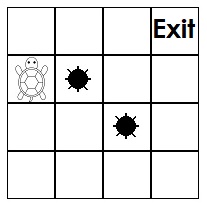
Before I started coding I wanted to imagine the grid in my mind and think about how the turtle can travel along the grid, and for every step check for any mines or exit. Because the rules of the game were already using a x and y coordinate system in the intial setup file to determine the position of the mines, turtle and exit, I decided to adopt the same system and represent each square in the grid with a x and y coordinate. Therefore another way of seeing the grid above is like this;
(0, 0) (1, 0) (2, 0) (3, 0)
(0, 1) (1, 1) (2, 1) (3, 1)
(0, 2) (1, 2) (2, 2) (3, 2)
(0, 3) (1, 3) (2, 3) (3, 3)
The top left corner is the starting point and it is represented by x position 0 and y position 0. At this point some of you might be wondering why I decided to place my 0,0 coordinate in the top left corner instead of the bottom left corner, which is a more mathematically natural position (so to speak). Yes I agree but I had to work with the example and the rules that I was given. Back to my reasoning, with the starting point for both x and y coordinate defined, I decided to increment the x coordinate by one as you move along the positive x axis, and increment the y coordinate by one as you move along the negative y axis. Every time the turtle moves I simply play around with the turtle’s x & y coordinate and for each step I cross check with other objects on the grid. Now that I had my game logic in place it was time to start coding.
Being a console application game the first step was to create a new .NET Core console application solution. I then decided to make my application configurable by adding a appsettings.json file in order to read the values of the setup file name and directory from there. Once I was able to read the setup file with all the commands I needed to make sure that all characters are valid before I create an instance of the game. I drafted some validation rules for each of the lines/ different components of the game.
The validation rules I came up with are the following;
- The minefield size. The first line must have a value and that value must have numbers or space only. It must also have just two numbers.
- The mines list of coordinates. The second line must have numbers, space and comma only. The coordinates must be validated so that they are in the minefield and not outside.
- The exit coordinate. The third line must have numbers and space only. It must also have just two numbers and the coordinate must be in the minefield and not outside.
- The start coordinate. The fourth line must have a value and that value must have numbers, space or the letters N, S, E & W. It must have just three non-white space characters and the coordinate must be in the minefield not outside.
- The moves. The fifth and any following lines must have just the letters R, L & M, or space only.
- If all of the above is validated then make sure that the start and exit coordinate do not have the same value and that the mines’ coordinates values aren’t the same as the start or exit coordinates.
| public class Validation | |
| { | |
| private (int, int) _gridSize; | |
| private List<(int, int)> _minePositions; | |
| private (int, int) _exitPosition; | |
| private (int, int) _startPosition; | |
| public Result ValidateSetupFile(string[] setupLines) | |
| { | |
| var result = ValidateGrid(setupLines[0]); | |
| if (result == Result.ValidationOk) _gridSize = Util.ParseSetupLineInPosition(setupLines[0]); | |
| if (result == Result.ValidationOk) result = ValidateMinesList(setupLines[1]); | |
| if (result == Result.ValidationOk) result = ValidateExit(setupLines[2]); | |
| if (result == Result.ValidationOk) result = ValidateStart(setupLines[3]); | |
| if (result == Result.ValidationOk) result = ValidateMoves(setupLines.Skip(4).Take(setupLines.Length – 2).ToArray()); | |
| if (result == Result.ValidationOk) result = ValidateConcurrentObjectPositions(); | |
| return result; | |
| } | |
| private Result ValidateGrid(string firstLine) | |
| { | |
| // grid values are always required | |
| if (string.IsNullOrEmpty(firstLine)) | |
| return Result.MissingGridInput; | |
| foreach (char c in firstLine) | |
| { | |
| if ((c < '0' || c > '9') && c != ' ') | |
| return Result.InvalidGridInput; | |
| } | |
| if (firstLine.Trim().Split(' ').Length != 2) | |
| return Result.InvalidGridInput; | |
| return Result.ValidationOk; | |
| } | |
| private Result ValidateMinesList(string secondLine) | |
| { | |
| // the mines arent required. a grid can have no mines | |
| foreach (char c in secondLine) | |
| { | |
| if ((c < '0' || c > '9') && c != ',' && c != ' ') | |
| return Result.InvalidMinesInput; | |
| } | |
| _minePositions = Util.GetMines(secondLine); | |
| var result = Result.ValidationOk; | |
| foreach (var mine in _minePositions) | |
| { | |
| if (result == Result.ValidationOk) | |
| result = ValidateIfObjectIsInGrid(mine, Result.OutOfBoundsMines); | |
| } | |
| return result; | |
| } | |
| private Result ValidateExit(string thirdLine) | |
| { | |
| // the exit isnt required but the turtle will always be lost | |
| foreach (char c in thirdLine) | |
| { | |
| if ((c < '0' || c > '9') && c != ' ') | |
| return Result.InvalidExitInput; | |
| } | |
| if (thirdLine.Trim().Split(' ').Length != 2) | |
| return Result.InvalidExitInput; | |
| _exitPosition = Util.ParseSetupLineInPosition(thirdLine); | |
| return ValidateIfObjectIsInGrid(_exitPosition, Result.OutOfBoundsExit); | |
| } | |
| private Result ValidateStart(string fourthLine) | |
| { | |
| // the turtle/start position is always required since moves are executed against this | |
| if (string.IsNullOrEmpty(fourthLine)) | |
| return Result.MissingStartInput; | |
| foreach (char c in fourthLine) | |
| { | |
| if ((c < '0' || c > '9') && c != 'N' && c != 'S' && c != 'E' && c != 'W' && c != ' ') | |
| return Result.InvalidStartInput; | |
| } | |
| if (fourthLine.Trim().Split(' ').Length != 3) | |
| return Result.InvalidStartInput; | |
| _startPosition = Util.ParseSetupLineInPosition(fourthLine); | |
| return ValidateIfObjectIsInGrid(_startPosition, Result.OutOfBoundsStart); | |
| } | |
| private Result ValidateMoves(string[] restOfLines) | |
| { | |
| // the moves arent required, you can declare start position and stay put | |
| foreach (string line in restOfLines) | |
| { | |
| foreach (char c in line) | |
| { | |
| if (c != 'R' && c != 'L' && c != 'M' && c != ' ') | |
| return Result.InvalidMovesInput; | |
| } | |
| } | |
| return Result.ValidationOk; | |
| } | |
| private Result ValidateIfObjectIsInGrid((int, int) objectPosition, Result result) | |
| { | |
| if (objectPosition.Item1 < 0 || | |
| objectPosition.Item2 < 0 || | |
| objectPosition.Item1 >= _gridSize.Item1 || | |
| objectPosition.Item2 >= _gridSize.Item2) | |
| return result; | |
| return Result.ValidationOk; | |
| } | |
| private Result ValidateConcurrentObjectPositions() | |
| { | |
| // mines -> start/exit | |
| foreach (var mine in _minePositions) | |
| { | |
| if ((mine.Item1 == _startPosition.Item1 && mine.Item2 == _startPosition.Item2) || | |
| (mine.Item1 == _exitPosition.Item1 && mine.Item2 == _exitPosition.Item2)) | |
| return Result.MineSamePositionStartExit; | |
| } | |
| // start -> exit | |
| if (_startPosition.Item1 == _exitPosition.Item1 && _startPosition.Item2 == _exitPosition.Item2) | |
| return Result.StartExitSamePosition; | |
| return Result.ValidationOk; | |
| } | |
| } |
Each validation method is returning an object Result. This is just an enum that I created to return specific outcomes, or in this case validation errors, to the user. The first method in the class is just an orchestration method that validates each line of the file step by step. This is then followed by a set of validation methods which are quite straight forward and I explicitly check for any non-valid characters. The last two methods are slightly more logical and I use the reasoning I explained above to check if any items occupy the same tile. If they have the same coordinate then validation fails. To make sure object’s are not outside of the grid I check an object’s coordinates and make sure they are not less that 0,0 as this is the starting point and not more than the grid’s size.
I also created a utility static class and added a couple of methods to parse a string from the setup file into a tuple of two integers, which are easier to work with when you’re incrementing or decrementing.
| public static class Util | |
| { | |
| public static (int, int) ParseSetupLineInPosition(string line) | |
| { | |
| var t = line.Trim().Split(' '); | |
| return (int.Parse(t[0]), int.Parse(t[1])); | |
| } | |
| public static List<(int, int)> GetMines(string line) | |
| { | |
| var positions = line.Trim().Split(' '); | |
| var mineList = new List<(int, int)>(); | |
| foreach (string position in positions) | |
| { | |
| var pos = position.Split(','); | |
| mineList.Add((int.Parse(pos[0]), int.Parse(pos[1]))); | |
| } | |
| return mineList; | |
| } | |
| public static string GetEnumDescription(System.Enum enumValue) | |
| { | |
| var enumMember = enumValue.GetType().GetMember(enumValue.ToString()).FirstOrDefault(); | |
| var descriptionAttrbs = enumMember.GetCustomAttributes(typeof(DescriptionAttribute), true); | |
| return ((DescriptionAttribute)descriptionAttrbs[0]).Description; | |
| } | |
| } |
At this point my Main method was looking something like this.
| public static class Program | |
| { | |
| static void Main(string[] args) | |
| { | |
| var cfg = InitOptions<AppConfig>(); | |
| var setupDirectory = Path.Combine(cfg.SetupFilePath, cfg.SetupFileName); | |
| var setupLines = File.ReadAllLines(setupDirectory); | |
| var validation = new Validation(); | |
| var result = validation.ValidateSetupFile(setupLines); | |
| if (result == Result.ValidationOk) | |
| // execute moves | |
| Console.WriteLine(new Response(result).Description); | |
| Console.ReadKey(); | |
| } | |
| private static T InitOptions<T>() where T : new() | |
| { | |
| var config = InitConfig(); | |
| return config.Get<T>(); | |
| } | |
| private static IConfigurationRoot InitConfig() | |
| { | |
| // load setup file name and path from appsettings.json | |
| var builder = new ConfigurationBuilder() | |
| .AddJsonFile($"appsettings.json", true, true) | |
| .AddEnvironmentVariables(); | |
| return builder.Build(); | |
| } | |
| } |
So far I managed to came up with my logic rules for the game, load the data from the setup file and validate it. In my next post I will be covering the movement of the turtle and determining the game’s outcome.
See you in part two,
Bjorn
 It's not a bug, it's a feature
Pingback: developing a console application game – part 2 | It's not a bug, it's a feature
Pingback: integration testing a .net core console application | It's not a bug, it's a feature